

A mobile application (mobile app) in the cryptocurrency context refers to smartphone software applications designed for managing digital assets, executing blockchain transactions, accessing DeFi protocols, trading cryptocurrencies, and interacting with Web3 services from mobile devices.
Crypto mobile apps range from simple portfolio trackers and wallet applications to full-featured trading platforms, DApp browsers, and decentralized identity tools. Mobile apps provide a convenient interface for crypto services, but adoption varies by market and service; smartphone subscriptions, ownership, and app users are different measures.
Origin & History
| Date | Event |
|---|---|
| 2008 | Apple App Store launches, creating the mobile app economy |
| 2011 | First Bitcoin wallet apps appear on Android (Bitcoin Wallet by Andreas Schildbach) |
| 2013 | Coinbase introduces early mobile access for Bitcoin users |
| 2015 | MyEtherWallet launches as a web-based Ethereum wallet; its mobile app follows later |
| 2016 | MetaMask launched as browser extension by ConsenSys |
| 2018 | Trust Wallet (acquired by Binance) becomes leading mobile crypto wallet |
| 2020 | MetaMask Mobile publicly launches (September 2020) |
| 2020 | DeFi mobile apps explode – Uniswap, Aave accessible via mobile wallets |
| 2021 | Mobile exchange apps expand access to crypto trading; rankings vary by store, country, and period |
| 2022 | Apple clarifies NFT-related app rules; payment requirements depend on storefront and current policies |
| 2023-2024 | Mobile-first crypto super-apps and account abstraction improve user experience |
How It Works
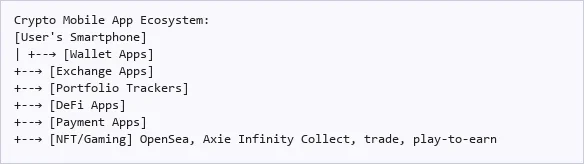
| Trust Wallet, MetaMask Mobile |
|---|
| Store keys, send/receive, DApp browser |
| Coinbase, Binance, Kraken |
|---|
| Buy, sell, trade crypto |
| CoinGecko, CoinMarketCap, Delta |
|---|
| Track prices, P&L, alerts |
| Uniswap, Aave (via wallet browser) |
|---|
| Swap, lend, borrow, yield farm |
| Strike, BitPay, Flexa |
|---|
| Spend crypto at merchants |
| App Category | Key Features | Security Considerations |
|---|---|---|
| Wallets | Key storage, transaction signing, DApp browser | Seed phrase backup, biometric auth |
| Exchanges | Trading, fiat on-ramp, staking | 2FA, withdrawal whitelists |
| Portfolio trackers | Price alerts, P&L, news | API key permissions (read-only) |
| DeFi interfaces | Protocol interaction, yield farming | Transaction approval review |
| Payment apps | POS payments, Lightning, remittances | Spending limits, pin protection |
| Identity/Auth | DID, credential management, Web3 login | Secure enclave, backup recovery |
In Simple Terms
- Crypto on a phone: Mobile apps let users check prices, trade, make payments, or interact with DeFi. Features and availability vary by app and jurisdiction.
- Wallet apps: Apps like Trust Wallet and MetaMask Mobile store your cryptographic keys and let you sign transactions, interact with DApps, and manage multiple cryptocurrencies from your phone.
- Exchange apps: Coinbase, Binance, and Kraken apps let you buy, sell, and trade crypto with a user-friendly interface, often including features like recurring buys, staking, and price alerts.
- App-store requirements: Crypto and NFT apps must follow current store policies. In-app purchase rules, commissions, and external-payment options vary by storefront and developer programme.
- Mobile-first design: The best crypto apps are designed mobile-first, recognizing that especially in emerging markets, smartphones are the primary (and often only) computing device available to users.
Real-World Examples
| Scenario | Implementation | Outcome |
|---|---|---|
| Coinbase mobile app | Full-featured exchange app with simple buy/sell interface | Provides mobile access to supported exchange services; registered-user totals are not app-download counts |
| MetaMask Mobile | Mobile wallet with built-in DApp browser | Users access supported DeFi, NFT, and Web3 services through the mobile wallet |
| Strike app | Bitcoin Lightning payments via mobile | Lightning payments can settle quickly; service fees, conversion, liquidity, and cash-out conditions still matter |
| Chivo Wallet launch (2021) | El Salvador introduces a government-backed wallet | A historical mobile-distribution example; check current availability and legal rules separately |
| Phantom Wallet | Solana mobile wallet with swap and DApp capabilities | Leading mobile gateway to Solana ecosystem |
Advantages
| Advantage | Description |
|---|---|
| Accessibility | Smartphone ownership exceeds bank account ownership globally |
| Convenience | Manage crypto assets anytime, anywhere |
| Biometric security | Fingerprint and face recognition add security layers |
| Push notifications | Real-time alerts for price movements, transactions, and security events |
| Rapid iteration | Mobile apps can be updated frequently to add features and fix issues |
| Financial inclusion | Enable crypto access for the unbanked through just a smartphone |
Disadvantages & Risks
| Disadvantage | Description |
|---|---|
| App store gatekeeping | Apple and Google can restrict or remove crypto apps |
| Security risks | Mobile devices vulnerable to malware, SIM swaps, and physical theft |
| Limited screen space | Complex DeFi operations can be difficult on small screens |
| Platform fees | Store commissions may apply to eligible digital purchases; they are not a universal charge on all crypto transfers |
| Fake apps | Scam wallets and fake exchange apps regularly appear in app stores |
| Data privacy | Mobile apps may collect extensive user data and require permissions |
Risk Management Tips: Use official download links, enable the security features supported by the app, protect recovery material, and limit funds exposed to a device used for everyday browsing. (Source: OWASP mobile security)
FAQ
Q: Is it safe to keep crypto on a mobile wallet?
A: Mobile-wallet security depends on key storage, software, backups, and user behaviour. Biometrics or a phone’s secure hardware do not prove that every wallet operation is protected by that hardware. A hardware wallet can isolate signing keys, but users must still inspect approvals and guard recovery material. (Source: Deterministic wallet recovery)
Q: Can I use DeFi on my phone?
A: Yes, through wallet apps with built-in DApp browsers (MetaMask Mobile, Trust Wallet) or through dedicated DeFi mobile apps. The experience is improving but can still be complex compared to desktop interfaces.
Q: How do App Store rules affect NFT purchases?
A: Apple permits certain NFT-related services through in-app purchase, subject to its guidelines. Commission rates and permitted external purchase links depend on the storefront, programme, and current rules. There is no universal 30% charge on every NFT or cryptocurrency transaction. (Source: Apple app rules)
Q: What’s the most downloaded crypto app?
A: Rankings change by country, store, platform, and measurement period. A valid comparison needs dated download data; registered exchange users are not equivalent to mobile-app downloads.
Conclusion
A mobile application can make crypto easier to access, but convenience does not establish safety. Verify the publisher, permissions, custody model, and recovery process before entrusting funds to it.
Further reading on UPay: Crypto wallet types; Private key security; Making crypto payments