



AI bots are no longer just digital assistants, they’re managing operations, running marketing campaigns, tracking subscriptions, and making decisions that once required a human hand on the wheel.
But autonomy raises a real question: how does an AI bot actually pay for what it needs to do?
That’s where UPay Card comes in giving your AI bot a secure, controlled way to make payments on its own. This guide covers how your AI bot can use UPay Card, and what that looks like in real workflows.What Is an AI Bot?
First things first:
What Is an AI Bot?
An AI bot is a software application powered by artificial intelligence that can perform tasks, make decisions, and interact with systems or users with minimal human intervention.
Unlike traditional automation tools that follow fixed rules, AI bots can analyze information and learn from patterns.
They can also adapt their actions based on changing circumstances. Today, AI bots are used across several industries.
Customer support bots answer inquiries around the clock, and AI assistants help schedule meetings and manage workflows. Additionally, more advanced AI agents can conduct research, monitor business operations, and even execute complex tasks on behalf of users.
As AI technology continues to evolve, these bots are becoming increasingly autonomous. Rather than simply providing recommendations, they are beginning to take action independently.
Read also: How to Accept USDT Payments for Business: Everything You Need to Get Started.
Ways Your AI Bot Can Use UPay Cards
As AI bots become more capable, businesses are increasingly using them to perform tasks that go beyond data analysis and decision-making.
These tasks include:
1. Subscription Management
Many businesses rely on multiple software tools, APIs, and digital services to operate efficiently. An AI bot can monitor subscription statuses, renew services before they expire, and pay recurring fees automatically.
This helps prevent service interruptions and reduces the need for manual subscription management.
2. Cloud Infrastructure Payments
Cloud resources often scale based on usage. An AI bot can monitor resource consumption and automatically pay for additional computing power, storage, or bandwidth when needed.
This ensures business operations continue smoothly without delays caused by manual payment processes.
3. Marketing and Advertising
AI-powered marketing agents can manage advertising campaigns across different platforms.
Beyond optimizing campaigns, they can also purchase ad credits, allocate budgets, and make payments when predefined conditions are met.
This enables faster campaign execution and more responsive marketing operations.
4. E-commerce Operations
In e-commerce environments, AI bots can help manage inventory and supplier relationships. For example, a bot can detect when stock levels are running low.
It can also place an order with an approved supplier, and complete the payment process within predefined spending limits. This reduces operational bottlenecks and helps maintain inventory levels.
5. Business Process Automation
Many routine business processes involve payments, such as paying service providers or settling operational expenses.
AI bots can execute these approved transactions automatically, eliminating repetitive manual tasks and allowing teams to focus on higher-value work.
Read also: Crypto Scams: The SHIELD Guide to Spotting and Avoiding Every Fraud Type.
How Your AI Bot Can Use UPay Cards: A Step-by-Step Guide
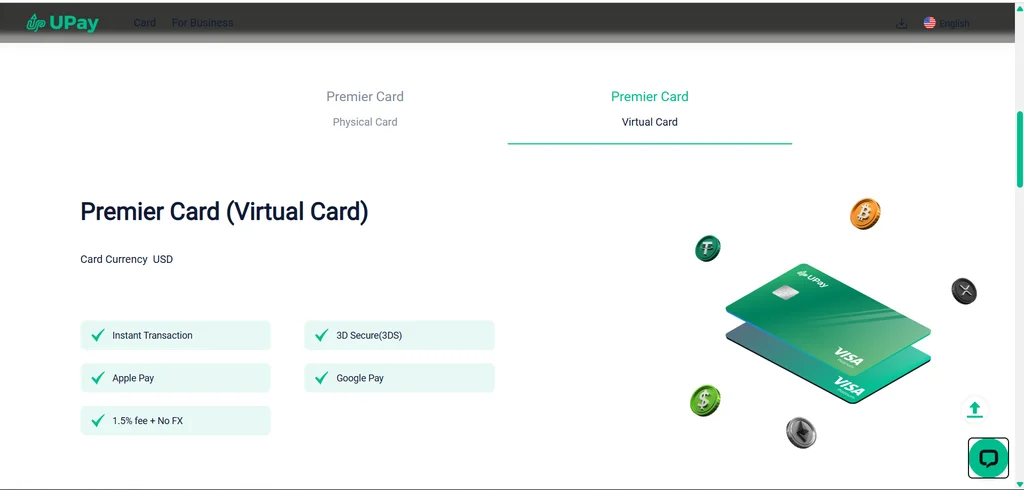
Although UPay is not a native AI automation platform, you can still use your UPay virtual card as the payment method within AI-powered workflows.
The idea is simple: your AI bot performs the task, a third-party automation platform coordinates the workflow, and your UPay Card is used by online services that accept card payments whenever a transaction is required.
In other words, the AI bot doesn’t connect directly to UPay. Instead, it interacts with applications that already accept card payments, while your UPay Card handles the financial side of the transaction.
1. Create and Fund Your UPay Virtual Card
Start by creating a UPay account and generating a virtual card. Once your identity has been verified, fund the card with the amount you intend to use for AI-related expenses.
Using a dedicated card for automation projects makes it easier to monitor costs and separate them from your everyday spending.
2. Build Your AI Workflow
Next, build your automation using an AI platform such as ChatGPT, Claude, or an AI model accessed through an API.
You can then connect these services with workflow automation platforms like n8n, Make, Zapier, or your own custom application.
In this setup, the AI model is responsible for making decisions or generating outputs, while the automation platform determines what happens next.
3. Connect the Workflow to Services That Accept Card Payments
Many AI workflows eventually interact with services that rely on recurring subscriptions or usage-based billing. For example, your workflow may provision cloud resources, trigger a marketing campaign, request additional API credits, or renew a software subscription.
To enable payments, add your UPay virtual card as the payment method within those services. When the service processes a subscription renewal or usage charge, it bills the saved UPay Card according to its normal payment process.
4. Test Your Automation Carefully
Before relying on the workflow in production, run several test scenarios. Confirm that the workflow behaves as expected and that any resulting payments are processed correctly by the service using your saved UPay Card.
Testing helps prevent unnecessary charges and ensures the workflow behaves as expected.
5. Monitor and Manage Your Spending
Even highly automated systems require regular oversight. It’s good practice to always review your UPay transaction history alongside the logs generated by your automation platform.
This is basically to ensure that payments match the intended workflow. If a subscription is no longer needed or an automation changes, update or remove the associated payment method to avoid unnecessary recurring charges.
Benefits of Using UPay Cards with AI Bots

When used as the payment method within AI-powered workflows, UPay Cards can help simplify how businesses and individuals pay for AI tools, subscriptions, and other digital services.
While the AI bot performs the automated tasks, the UPay Card provides a convenient way to pay for the services that support those workflows. Here are some of the benefits you get to enjoy:
1. Convenient Payment for AI Services
Many AI platforms, cloud providers, and SaaS tools require a payment card for subscriptions or usage-based billing.
The UPay Card can be added as the payment method, allowing these services to process recurring or on-demand payments without requiring a different card.
2. Better Separation of Expenses
Using a dedicated UPay Card for AI-related subscriptions makes it easier to distinguish automation expenses from everyday personal or business spending.
This can simplify budgeting and expense tracking, particularly if you use multiple AI services.
3. Enhanced Financial Security
Rather than using your primary debit or credit card across numerous AI platforms, you can use your UPay virtual card as a separate payment method.
This helps reduce the exposure of your primary banking details when subscribing to multiple online services.
4. Supports International Payments
Many AI platforms operate globally and bill users in major currencies. The UPay Card can be used wherever supported card payments are accepted, making it easier to pay for international AI services from a single payment source.
5. Works with Automated Billing
Most AI tools charge users through recurring subscriptions or usage-based billing. Once your UPay Card has been added as the payment method, these services can automatically process future charges according to their normal billing cycles, reducing the need for manual payments.
Read also: Beyond the Hype: Why Is Bitcoin So Expensive?
Security Considerations When Allowing AI Bots to Make Payments
When considering how your AI Bot can use UPay cards as the payment method, it’s important to combine payment security with good automation practices.
Although the AI bot may automate tasks, you remain responsible for managing your payment settings and monitoring account activity.
Use a Dedicated Payment Card
Where practical, use a separate UPay virtual card for AI-related subscriptions instead of the same card you use for everyday purchases.
Keeping AI expenses separate makes spending easier to review and helps reduce the impact of unexpected charges.
Protect Your Card Details
Only enter your UPay Card information into trusted AI platforms and reputable online services. If you’re using automation tools, avoid exposing your card details in scripts, public repositories, or unsecured environments.
Review Recurring Subscriptions Regularly
AI tools often rely on monthly or usage-based billing. Review your active subscriptions periodically to ensure you’re only paying for services you still use and to identify any unexpected charges.
Enable Available Security Features
Where available, enable security features such as two-factor authentication on your UPay account and the AI platforms connected to your workflow. Strong account security helps reduce the risk of unauthorized access.
Monitor Your Transactions
Check your UPay transaction history regularly to confirm that charges match the AI services you expect to pay for. Early detection of unexpected transactions allows you to take action more quickly.
Test Automation Before Scaling
Before relying on an automated workflow in production, test it thoroughly. Confirm that payment-related actions behave as expected and that any failures or unexpected conditions are handled safely rather than causing unintended charges
Challenges of Enabling AI Bots to Make Payments
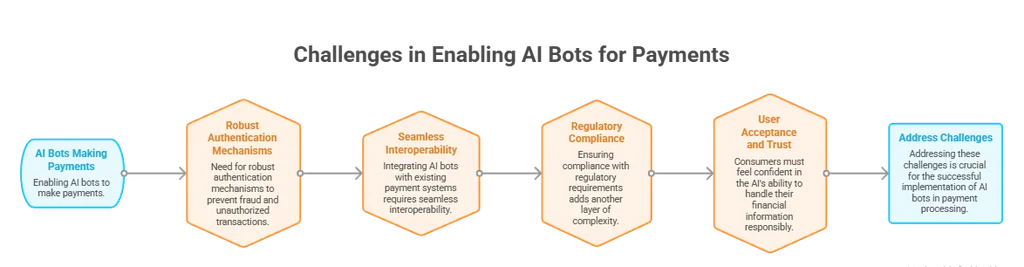
Below are some of the challenges in using AI Bots to make payments:
1. Balancing Automation with Human Oversight
AI bots can automate repetitive tasks, but not every payment should happen without review. For routine subscriptions or predictable expenses, automation can save time.
However, high-value or unusual transactions may still require human approval. Finding the right balance between automation and oversight helps reduce risk while preserving efficiency.
2. Managing Multiple AI Services
As more AI tools become part of a workflow, managing subscriptions and recurring payments can become increasingly complex.
Keeping track of which services use your UPay Card, monitoring renewal dates, and reviewing active subscriptions regularly can help prevent duplicate or unnecessary charges.
3. Handling Payment Failures
Automated workflows may occasionally encounter payment issues caused by insufficient card balance, expired card details, connectivity problems, or billing errors on the service provider’s side.
Planning for these situations with notifications or fallback processes helps minimize disruptions.
4. Maintaining Security
Any workflow involving payments should be designed with security in mind. Protecting your UPay Card details, securing the accounts connected to your automation tools, and reviewing transactions regularly can help reduce the risk of unauthorized activity or unintended charges.
5.Staying Compliant
If your business uses AI to automate operational tasks, you should ensure that its payment processes comply with internal financial policies and any applicable regulations.
Maintaining accurate transaction records and periodically reviewing automated workflows supports accountability and good governance.
6. Integrating Different Tools
AI-powered workflows often involve several services working together, including AI platforms, automation software, and payment-enabled applications.
Ensuring these tools work together reliably may require testing and periodic updates as platforms evolve.
Conclusion
As AI continues to automate more aspects of business and personal productivity, having a reliable way to pay for the services that power these workflows is becoming increasingly important.
Understanding how your AI Bot can use UPay Cards helps you see how a virtual crypto card can fit into an AI-powered ecosystem, allowing subscriptions, APIs, and other digital tools to be paid for through supported card payments.
Although UPay Cards are not AI automation tools themselves, they can serve as the payment method behind the AI services and platforms your workflows depend on.
By combining AI applications with trusted automation tools and using a UPay Card for billing, you can simplify recurring payments while maintaining visibility over your expenses.
As with any automated workflow, the key is to implement it thoughtfully, monitor transactions regularly, and follow good security practices. When used responsibly, a UPay Card can support the payment side of your AI workflows, helping you automate routine processes more efficiently.