


Imagine it is Friday evening, and you are out with friends at your favorite restaurant. The bill arrives, you realize you left your wallet at home, and your card is on your phone. You hold the phone over the terminal and pay your share.
That tap is the part most guides skip. A virtual card is never plastic, so the only way it reaches a shop counter is through Apple Pay or Google Pay.
So this walks the whole route, using UPay as the worked example: getting a card, funding it, paying with it, and getting your balance back.
Key Takeaways
- A virtual crypto card is a card number, an expiry date and a security code issued inside an app, with no plastic. Those three fields are the entire card, which is why guarding them matters most.
- UPay’s current consumer Premier and Platinum cards run on Visa, and money reaches the card from your UPay wallet through the app’s Collateral/Recharge screen, not by a transfer to a linked card.
- UPay’s Help Center states that “Virtual cards do not support withdrawal features”. Its ATM article names only the physical UPay Precious Credit Card for cash.
- UPay publishes a list of platforms its virtual cards decline, and Spotify, Amazon Digital, Amazon Media, DoorDash, Deliveroo, Audible, Tinder and Lyft are on it.
- UPay publishes Apple Pay and Google Pay support for its virtual cards, and both announcements name the Platinum (Virtual) card. Which market you are in decides whether that helps: Apple’s own list covers neither India nor Nigeria.
- Paying with crypto is normally a disposal for tax, and a card that converts at the checkout makes one every time you buy something.
What is a Virtual Crypto Card?

A virtual crypto card is a card number, an expiry date and a security code, issued inside an app and funded from a crypto balance rather than a bank account. Those three fields are the whole card.
It runs on an ordinary card network, so the shop sees a normal card payment and never touches your crypto. UPay’s consumer cards run on Visa, issued by partner institutions rather than by UPay itself.
Conversion happens on the provider’s side. UPay’s homepage says its wallet “Supports major cryptos like BTC, ETH, USDT, USDC” and that “Payments convert automatically to USD, EUR, AED, and other local currencies”.
Related: Upay Crypto Card
Comparison with Traditional Bank Cards
| Question | Virtual crypto card | Traditional bank card |
|---|---|---|
| Funded by | A crypto balance you loaded | A bank account or credit line |
| Physical form | None, it lives in an app | Plastic, posted to you |
| Cash at a machine | UPay says virtual cards do not support withdrawals | Usually, with the bank’s fee |
| If the number leaks | Lock it, then cancel and replace | Call the bank, wait for the post |
| Who can open one | Set by nationality, not address | Set by residency and credit |
What Are Crypto Cards Used For?
Crypto cards have new possibilities for spending cryptocurrency by bridging the gap between digital assets and the fiat-based payment infrastructure. Let’s explore how they are commonly used.
Purchasing Goods and Services

Purchasing Goods and Services
Online you enter the card number, expiry and security code at checkout. In person you add the card to Apple Pay or Google Pay and tap. The merchant is paid in local currency.
Bill Payments and Subscription Services
Recurring payments work, but not everywhere, and UPay is open about where. Its unsupported scenarios article opens: “The virtual card is prohibited from binding any payment financial products, crypto currency and other high-risk platforms.”
The named list is long, specific and longer than any summary of it. It includes Spotify, Amazon Digital, Amazon Media, Audible, Deliveroo, DoorDash, Uber Eats, Lyft, Tinder and Taobao, alongside payment platforms including Wise, Stripe, Skrill, Adyen, Paystack and Venmo, with a further block of adult and high-risk sites.
Types of Crypto Cards
Virtual Crypto Cards
Digital only, built for online payments and phone wallets. The number can be locked in a tap, and cancelled and replaced without disturbing anything else you own, though cancelling is irreversible and the balance returns slowly.
Physical Crypto Cards
Plastic, posted to you, and the only kind that reaches a cash machine. This is where the two types genuinely differ.
Virtual cards do not support withdrawal features.
UPay Help Center, “Does UPay Cards Support ATM Withdrawals”, last updated 7 December 2025
UPay’s own documents do not fully agree here. Its fee tables list a 1% ATM fee for the physical Premier and Platinum cards, with daily limits of 3,750 USD and 3,000 USD, while its ATM help article names only the physical Precious card.
If cash is why you are buying, confirm which card that applies to first. More on using a crypto card at an ATM sits alongside this guide.
Key Benefits of Using a Virtual Crypto Card
A virtual card removes the risk of physical theft or loss, which is not the same as removing risk. The number can still be phished or taken from a breached merchant, so treat it as a secret.
The honest drawback is volatility: what sits on the card came from a crypto balance, so what you can spend moves with the market until you spend it.
How do I use my Virtual Crypto Card (Using UPay Card as a Case Study)
In the order you actually do them. A funded wallet is not a funded card, and most guides stop at the wallet. Using UPay as a case study, let’s walk through the process:
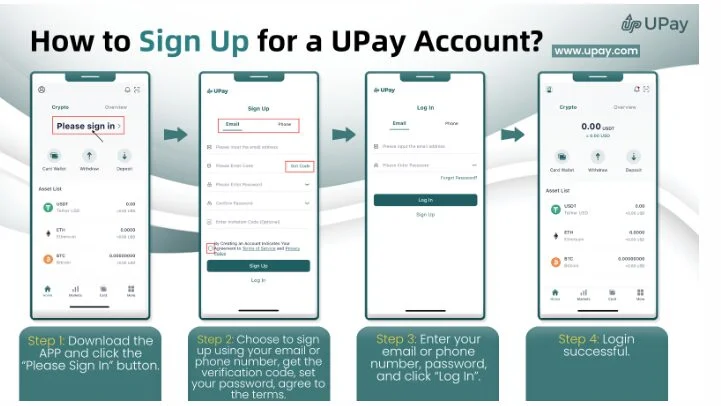
How to Sign Up on UPay
Sign up and verify your identity
Download UPay Wallet, the consumer app, register with an email address or phone number, enter the code it sends and set a password. That gets you an account, not a card.
Verification comes next and is not optional. UPay’s Identity Verification Guide has you choose your region and document type, upload clear photos of your ID, then complete a liveness check. Every regulated issuer runs identity verification.
Put crypto in the wallet
The card is fed from the wallet, so the wallet needs something in it first. UPay’s deposit guide has you tap “Deposit”, choose Tether, Ethereum or Bitcoin, then pick the network chain and copy the address or scan the QR code.
Pick the wrong chain and the funds do not arrive, so check it twice. The status shows in your wallets bill.
Apply for the card
UPay’s Card Application Tutorial gives five steps: select a card type and apply, confirm the activation agreement and pay, complete identity verification, enter the cardholder’s address, then submit and wait for approval.
Which card you can apply for depends on nationality rather than address. UPay’s restricted list blocks applications from nationals of several states, including Turkey for both cards and the USA, China, India, Pakistan, Indonesia, Saudi Arabia and Vietnam for Platinum.
That list is longer than any summary, UPay revises it, and it lives in the Help Center, so check the current version. Our guide to virtual card issuance covers what approval involves.
Put money on the card
There is no screen called “Transfer to Card”. UPay’s Card Collateral / Recharge Guide names the control plainly.
Open the app, tap “Card”, select your card and tap “Collateral/Recharge”. Choose the currency, enter an amount, apply a coupon code if you have one, then confirm.
Note the word UPay uses. Value moves from the wallet onto the card and is held there, so wallet balance and card balance are two different numbers.
Pay online
Your app shows the card number, expiry date and security code in the card section. Type them into the checkout as you would any card, and give your billing address if asked, since on many networks a mismatch triggers a decline.
Pay in a shop with Apple Pay or Google Pay
This is the mechanism that makes the opening scene possible. UPay’s announcements state that the Platinum (Virtual) card supports both Apple Pay and Google Pay.
UPay’s Apple Wallet walkthrough is short: tap the add button, choose “Enter Card Details Manually”, enter the name, card number, expiration date and security code, then accept the issuer terms. Our step-by-step on how to add crypto cards to Apple Wallet covers it with screenshots.
Both wallets are market-limited, and Apple’s own country list includes neither India nor Nigeria, so check Apple’s list and UPay’s Help Center for your market before counting on tapping.
What the card costs
UPay publishes two fee tables, virtual and physical. These are the main figures they carry.
| Charge | Virtual Premier and Platinum | Physical Premier and Platinum |
|---|---|---|
| Issuance | 10 USDT | 100 USDT |
| Recharge, called collateral | 2% | 2% |
| Replacement | 10 USDT | Not published |
| Annual fee | None | None |
| ATM withdrawal | Not supported | 1%, daily caps 3,750 USD and 3,000 USD |
The physical Precious card costs 100 USDT to issue and the VIP Metal card 400 USDT, both with a 1% collateral fee. Do not assume a charge is zero because it is not listed here; check the current tables.
Getting money back off the card
Plan this before loading a large amount. UPay documents no partial unload while the card is open.
After the settlement is completed, we will refund the card balance to your UPay Wallet.
UPay Help Center, “Cards Cancellation Rules”
That refund follows cancellation, which UPay calls “an irreversible operation”, and settlement takes up to 30 days. Load what you intend to spend, not what you want to store.
Where a Virtual Card Gets Declined
UPay names five causes of decline: not enough on the card, a high-risk merchant category, a network problem, an incorrect security code, and one specific to this product.
That last one is “Non-support for 3D Secure Verification on Virtual Cards”, which UPay says “might lead to the inability to complete transactions with certain specific merchants”.
Worth knowing: UPay’s Platinum launch advertises 3D Secure protection while its declines article lists 3DS non-support on virtual cards. The two disagree, so treat the checkout as the test.
Ensuring Security with Virtual Crypto Cards
Protect the card number, expiry and CVV
To ensure the safety of your account and funds, please refrain from sharing detailed information about your UPay Cards, especially the CVV code.
UPay Help Center, “UPay Cards Security Important Reminder”
Nobody legitimate asks for a security code by message, email or call, and the full details do not belong in a note or a screenshot.
Enable Two-Factor Authentication (2FA)
Turn it on, and prefer an authenticator app or a passkey to a text message where the app offers a choice. Codes sent by SMS can be redirected by a SIM swap, and crypto holders are who attackers target for it. Our glossary covers two-factor authentication.
Beware of Phishing Scams
Criminals send fake messages pretending to be card providers, pointing at sites built to capture credentials. Check the sender and open the app yourself. Avoid sharing your login credentials or seed phrases, which can lead to account takeover if shared.
Lock the card if something looks wrong
Locking is the fastest thing a cardholder can do. Open “Card”, select the card, choose “Lock Card”, tap “One Clink Lock/Unlock”, then enter your fund password and SMS code.
Use Strong, Unique Passwords
In a 2020 report by LastPass, 91% of users know reusing passwords is risky, yet 66% still do. A unique password in a password manager closes the cheapest route into your account.
Spending Crypto and Tax
A card that converts at the till makes a disposal every time it pays. In most jurisdictions that is a taxable event.
India, this blog’s largest audience, taxes gains on virtual digital assets at 30% plus a 1% tax deducted at source, under the Income-tax Act 2025 in force since 1 April 2026. Other countries treat a disposal differently, and none of this is advice.
The answer is record keeping rather than worry: export your card statement and wallet history, keep them together, and check your own country’s treatment. Our guide to reporting cryptocurrency income is the place to start.
Conclusion
A virtual crypto card works well once you know the order. Verify, apply, deposit, recharge, spend, and add it to a phone wallet to pay in person.
Two habits save the most trouble: check the merchant list before committing a subscription, and load only what you plan to spend.
FAQs
Does My Crypto Card Have a PIN?
A UPay virtual card uses no PIN online, where the number, expiry and security code are what the merchant asks for. A fund password does exist in the app and is required, with an SMS code, to lock or unlock the card.
How Do I Transfer Money from Crypto to Card?
Open “Card”, select the card, then tap “Collateral/Recharge”. Pick the currency, enter the amount, and confirm. The published recharge fee is 2% on Premier and Platinum.
There is no “Transfer to Card” screen and no fiat wallet in between. The wallet holds crypto; the card holds what you moved across.
How Do You Unlock a Crypto Card?
Open “Card”, select the card, choose “Unlock Card” and tap “One Clink Lock/Unlock”. Enter your fund password, which UPay also calls a PIN code, plus the SMS code. If the issuer blocked the card rather than you locking it, only support can clear it.
What is a virtual card in Nigeria?
A virtual card in Nigeria is a digital card for online payments in foreign currency, most often US dollars, without a domiciliary account. A crypto virtual card funds it from cryptocurrency instead of naira.
Nigeria appears on neither of UPay’s restricted lists, and the list is worth checking on the day you apply.
What virtual card can be funded with USDT?
UPay is a straightforward one, and it publishes this blog. Deposit Tether into the wallet, recharge the card, and spend anywhere the network is accepted, subject to the merchant list above.
Bybit also issues a virtual card, and its help centre lists USDT for every regional card. That list covers Argentina, Kazakhstan, Australia, Mexico, Brazil, Peru and Asia Pacific, not the EEA, the UK or India. Binance’s support pages say its card serves verified users in selected countries and publish no global list.