


In 2025, over 560 million people around the world used crypto wallets to secure $2.7 trillion in digital assets. Yet more than $2.1 billion was stolen in just the first six months of that year because of poor wallet choices and avoidable security mistakes.
In February 2025, Bybit suffered the largest crypto hack in history when $1.4 billion was drained from hot wallets. In August, BtcTurk lost $48 million after attackers compromised private keys. Meanwhile, people who used hardware wallets and stored their crypto offline? Their funds were completely untouched.
The difference was not luck. It came down to one thing: using the right wallet for the right purpose, and knowing how to use it properly.
Choosing a wallet feels overwhelming at first. Should you trust an exchange to hold your keys, or manage them yourself? Do you need a physical hardware device or is a mobile app good enough? Which wallets work with your specific coins? How do you balance security with ease of use?
One wrong decision here can mean losing everything. There is no “forgot password” option in crypto. There is no customer support that can recover funds sent to the wrong address. The stakes are real.
This article walks you through everything you need to know. You will understand all wallet types and when to use each one. You will get a step-by-step framework for matching wallets to your situation.
You will learn the security practices that kept people safe during 2025’s major hacks. And you will find setup guides, backup strategies, and answers to the most common questions people ask.
This is not another “best wallets” list. Those are everywhere. This is a decision guide that teaches you how to think about wallets, so you can make the right call for your own needs today and as those needs change.
What Is a Crypto Wallet?
A crypto wallet is a tool that stores your private keys. These are the cryptographic passwords that prove you own cryptocurrency and allow you to authorize transactions on the blockchain.
Here is something that trips up a lot of new users: your crypto wallet does not actually hold your coins. Your cryptocurrency lives on the blockchain at all times. Your wallet simply holds the keys that give you access to it. Think of it like a safety deposit box key. The key itself has no value, but it unlocks something that does.
The Three Things You Need to Understand
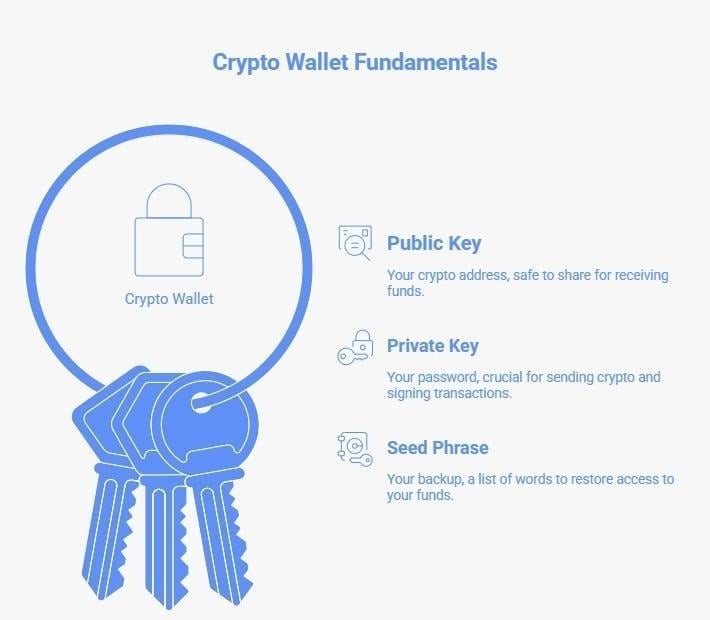
1. Your Public Key (Your Crypto Address)
This is like a bank account number. It is safe to share with anyone who wants to send you crypto. It is visible on the blockchain to anyone who looks. An example looks like this: 0x742d35Cc6634C0532925a3b844Bc9e7595f0bEb
2. Your Private Key (Your Password)
This is like your bank PIN, except nobody at any bank can reset it for you. Your private key allows you to send crypto and sign transactions. Anyone who gets hold of your private key controls your funds. This is why you will hear the phrase “not your keys, not your coins” repeated constantly in crypto. It is not just a slogan. It is the core principle of crypto ownership.
3. Your Seed Phrase (Your Backup)
When you create a wallet, it gives you 12 to 24 random words. These words are a human-readable backup of your private key. If your device breaks, gets stolen, or stops working, your seed phrase lets you restore access to your funds from any new device.
An example seed phrase looks like this: “witch collapse practice feed shame open despair creek road again ice edge”
You must write this down and store it somewhere safe offline. Never take a photo of it. Never email it to yourself. Never type it into any website that asks for it. If someone else gets your seed phrase, they own your crypto.
Why Having Your Own Wallet Matters
When FTX collapsed in 2022, millions of users lost access to their funds because they were held on the exchange. Same with BlockFi. When Bybit was hacked in 2025, $1.4 billion was gone. Exchange wallets put a third party between you and your money.
Your own wallet means you interact with the blockchain directly. You control access. No exchange can freeze your account, go bankrupt, or get hacked on your behalf.
Understanding Wallet Types: The Full Picture
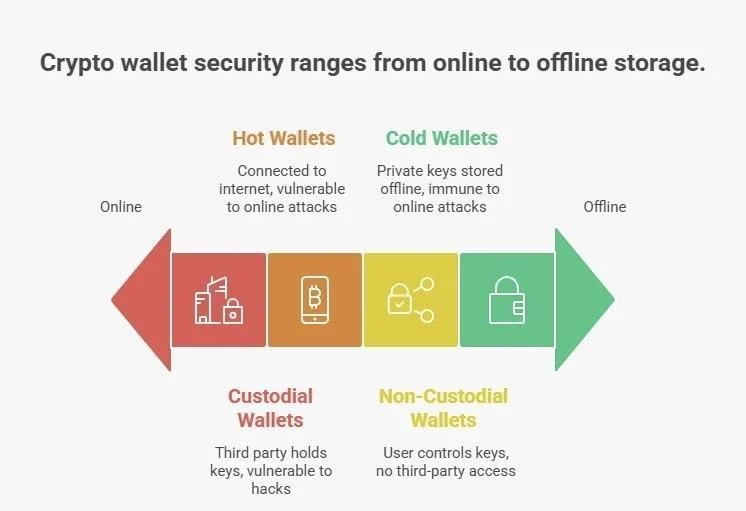
Not all wallets work the same way. There are two big ways to classify them.
1. Hot Wallets (56% of Market)
Hot wallets are always connected to the internet. They come as mobile apps, browser extensions, desktop programs, and web interfaces. Examples include MetaMask, Trust Wallet, Phantom, Coinbase Wallet, and Exodus.
Why people use them: instant access from any device, free to download, built-in access to DeFi protocols and apps, easy token swaps, real-time portfolio tracking.
The catch: they are vulnerable to hacking. In 2025, 62% of all stolen crypto came from hot wallets. The Phemex hack ($85 million) and BtcTurk breach ($48 million) both exploited hot wallet infrastructure.
Hot wallets are practical for active users who need to trade frequently, interact with DeFi, mint or trade NFTs, or handle regular transactions. They are best used for amounts you can afford to lose if something goes wrong. Most experienced users keep no more than 20 to 30% of their portfolio in hot wallets.
2. Cold Wallets (44% of Market, Growing)
Cold wallets store your private keys completely offline. They come as physical hardware devices or paper. Examples include Ledger Nano X, Ledger Flex, Trezor Safe 5, Tangem, and NGRAVE ZERO.
Why people use them: your private keys never touch the internet, immune to online attacks, ideal for large holdings.
The catch: they cost money ($50 to $250), are less convenient for frequent trading, have a learning curve, and there is a risk of physical loss.
Here is the important number from 2025: zero major cold wallet hacks occurred when devices were properly used. Every major breach that year targeted hot wallets or exchange infrastructure. If you hold significant value in crypto, cold storage is not optional. It is essential.
Cold wallets are best for long-term holders, anyone with over $5,000 in crypto, retirement-type holdings, and anyone who prioritizes security over convenience.
Also Read: How Many Crypto Wallets Do You Actually Need?
3. Non-Custodial Wallets
You control the private keys. The wallet software is just an interface. No third party can access your funds. No permission is needed for transactions. MetaMask, Trust Wallet, Exodus, Ledger, and Trezor are all non-custodial.
The advantages: true ownership, no counterparty risk, no KYC usually required, direct access to the full crypto ecosystem.
The disadvantages: if you lose your keys or seed phrase, your funds are gone forever. There is no support team to call. You carry the full responsibility. This is non-negotiable.
Non-custodial wallets suit experienced crypto users, DeFi participants, privacy-minded users, and anyone holding significant value.
4. Custodial Wallets
A third party, usually an exchange, holds your private keys on your behalf. Examples include Coinbase, Binance, Kraken, Gemini, PayPal Crypto, and Cash App Bitcoin.
The advantages: easy password recovery, customer support, beginner-friendly, sometimes insured, integrated buying and selling.
The disadvantages: exchange hack risk (Bybit: $1.4 billion, 2025), account freezing is possible, you need to pass KYC, and the crypto is not truly yours until you withdraw it.
As of 2025, 67% of active custodial wallet usage is KYC-linked. Platforms must now comply with AML requirements in most jurisdictions.
Custodial wallets work well for beginners who are still learning, people who want simple fiat on-ramps, and small amounts used for trading.
The Recommended Approach: Use Both
Most experienced crypto users follow what is sometimes called the 3-wallet approach:
- Cold hardware wallet: 70 to 80% of holdings for long-term storage
- Hot non-custodial wallet: 10 to 20% of holdings for DeFi, NFTs, and active trading
- Custodial exchange wallet: 5 to 10% for quick trades and fiat access
When Bybit lost $1.4 billion, users who followed this approach only had 5 to 10% of their holdings at risk.
Specialized Wallet Types Worth Knowing
1. DeFi Wallets
Built for interacting with decentralized finance protocols. They include built-in dApp browsers, token swaps, staking, and yield farming. MetaMask is the most widely used. Phantom dominates on Solana. About 198 million users globally now use DeFi wallets.
2. Multi-Chain Wallets
Support multiple blockchains in a single interface. Trust Wallet supports 100+ blockchains. Best Wallet supports 60+. These are increasingly important as the crypto world becomes more multi-chain.
3. MPC Wallets (Multi-Party Computation)
This is newer technology that eliminates seed phrases by splitting your private key cryptographically across multiple locations. No single point of failure exists. Zengo pioneered this for regular consumers. As of April 2025, no Zengo wallet had been hacked. A good option for people who worry about losing a seed phrase.
4. Mobile-First Wallets
Optimized for smartphones. Trust Wallet, Coinbase Wallet, and Zengo each have 10 million or more users. Telegram Wallet hit 14 million users in 2025, mostly in emerging markets.
The Decision Framework: How to Choose the Right Wallet for You
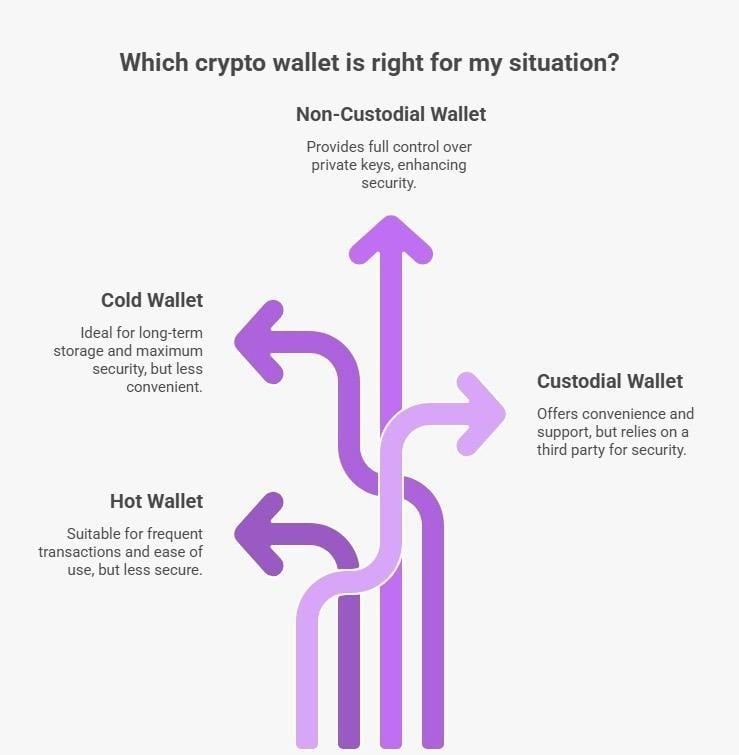
Stop thinking about which wallet is “the best.” The right question is: which wallet is right for your situation? Here is how to work through that.
Step 1: Know Your User Profile
Profile A: The Beginner (Under 6 Months Experience)
You are new to crypto. You hold $100 to $2,000. You want something simple. You need support if something goes wrong.
Go with: a custodial exchange wallet for your main holdings, plus Zengo if you want to start learning non-custodial concepts (Zengo has no seed phrase, so the risk of losing funds due to user error is lower).
Why: custodial gives you a safety net while you learn. Zengo lets you experience self-custody without the seed phrase management responsibility.
First priorities: enable 2FA right away. Start with amounts you are comfortable losing. Practice sending and receiving. Learn the terminology through actual use.
Profile B: The Active Trader or DeFi User
You trade multiple times a week. You use DeFi protocols. You hold $2,000 to $25,000. You need instant access.
Go with: MetaMask or Phantom for your trading and DeFi activity plus a Ledger Nano X for your base holdings.
Why: hot wallets give you instant DeFi access. Cold wallet secures the majority of your funds. You can interact with Uniswap, Aave, and OpenSea while keeping your core holdings safe.
Priorities: separate browser profiles for crypto use. Hardware wallet for any amounts you will not need in the next month. Revoke token approvals every month. Be careful what contracts you sign.
Profile C: The Long-Term Holder
You buy and hold for years. You hold $25,000 or more. You rarely access your funds. Security is your top priority.
Go with: a premium cold hardware wallet plus a backup device. Trezor Safe 5 or Ledger Flex as your primary. A second hardware wallet of the same type as backup. Minimal hot wallet usage only for purchasing, with immediate transfer to cold storage.
Why: every major hack in 2025 targeted hot wallets. Cold storage was untouched. For large holdings, cold storage is non-negotiable. Two devices protect you if one breaks or is lost.
Priorities: buy only from the manufacturer’s official website. Test recovery before large deposits. Store seed phrases in a bank safe deposit box. Consider metal backup plates that survive fire and water.
Profile D: The NFT Collector or Creator
You mint, buy, and sell NFTs regularly. You interact with OpenSea, Blur, or MagicEden. You have $5,000 to $50,000 in digital collectibles.
Go with: MetaMask for Ethereum NFTs, Phantom for Solana NFTs, and a Ledger for valuable pieces worth more than $5,000.
Why: hot wallets let you interact with marketplaces instantly. Valuable NFTs should move to cold storage after purchase. Keep a separate wallet for minting from untrusted contracts.
Priorities: enable hidden NFT filtering. Use a separate wallet for minting risky contracts. Review smart contract approvals monthly.
Profile E: The Institutional or Business User
You manage company funds or client assets. Multiple team members need access. You have compliance requirements. Holdings are $100,000 or more.
Go with: Gnosis Safe (multi-signature setup) or BitGo for institutional custody plus hardware wallets as backup. Fireblocks for regulatory reporting if needed.
Why: multi-signature prevents any single person from moving funds unilaterally. It creates an audit trail. Insurance is available. Regulatory compliance is built in.
Priorities: set up 3-of-5 or 4-of-7 multi-sig configurations. Establish internal approval procedures. Verify KYC and AML compliance. Get legal review of your custody arrangement.
Step 2: Assess Your Security Needs
Ask yourself these questions honestly:
What is your total crypto portfolio value?
- Under $1,000: a hot wallet with 2FA is acceptable
- $1,000 to $5,000: hot wallet plus seed phrase backup in a safe
- $5,000 to $25,000: cold wallet for 70% or more of your holdings
- $25,000 to $100,000: cold wallet is required, consider multi-sig
- Over $100,000: multi-signature cold storage, insurance, legal review
How comfortable are you with crypto technology?
- New to it: start with a custodial wallet, learn gradually
- Some experience: non-custodial hot wallet like MetaMask or Trust Wallet
- Experienced: hardware wallet with custom configurations
- Advanced: multi-sig, air-gapped setups
Can you safely store a seed phrase offline?
- Not confident: use an MPC wallet like Zengo or a custodial service
- Basic setup: paper backup in a home safe
- More careful: bank safe deposit box plus home safe
- Very security-minded: metal backup at multiple locations
How often do you transact?
- Daily: you need a hot wallet for speed
- Weekly: 80% cold, 20% hot is a reasonable split
- Monthly: 90% cold, 10% hot
- Rarely: 100% cold storage makes sense
Also Read: How to Unfreeze Cryptocurrency: Step-by-Step for Wallets & Exchanges (2026)
Step 3: Check Features and Compatibility
Before settling on a wallet, run through this checklist:
Asset support: Does it support all your coins? Does it handle multiple blockchains if you hold assets on different networks? Does it support NFTs if you need that?
DeFi access (if relevant): Does it have a built-in dApp browser? Does it support WalletConnect? Can you stake your assets?
Security features: Does it offer 2FA via authenticator app (not SMS)? Biometric authentication? Hardware wallet compatibility? Is the code open-source? Has it been through independent security audits?
User experience: Is there a mobile app? Desktop support? Active development? A community you can turn to for help?
Platform compatibility quick reference:
| Wallet | Windows | Mac | iOS | Android | Web |
| MetaMask | Yes | Yes | Yes | Yes | Yes |
| Ledger | Yes | Yes | Yes (via app) | Yes (via app) | No |
| Trust Wallet | No | No | Yes | Yes | Yes |
| Exodus | Yes | Yes | Yes | Yes | Yes |
| Trezor | Yes | Yes | Yes (via app) | Yes (via app) | Yes |
| Phantom | No | No | Yes | Yes | Yes (Extension) |
| Zengo | No | No | Yes | Yes | No |
Step 4: Understand the Costs
Software wallets cost nothing to download. MetaMask, Trust Wallet, Phantom, Exodus, and most others are free. You only pay blockchain network fees when you make transactions.
Hardware wallets are a one-time purchase:
- Budget: Trezor Model One ($49), Tangem 2-card set ($55)
- Mid-range: Ledger Nano X ($149), Trezor Safe 5 ($169)
- Premium: Ledger Flex ($249)
Once bought, they last years with no ongoing subscription cost.
Ongoing costs everyone pays: gas fees. These are transaction fees paid to the blockchain network, not to your wallet. They vary by blockchain:
- Ethereum: $1 to $50 per transaction depending on congestion
- Bitcoin: $0.50 to $10
- Solana: $0.00025 (nearly nothing)
- Polygon: $0.01 to $0.50
If you trade frequently, your blockchain choice matters a lot for costs. Solana and Polygon are dramatically cheaper than Ethereum.
Built-in swap fees: If you use the swap feature inside a wallet, you usually pay a markup on top of network fees. MetaMask charges 0.875% per swap. Exodus charges 1 to 3%. You can save money by using a DEX like Uniswap or PancakeSwap directly, which charges around 0.3% in most cases.
Security: What Actually Keeps Your Crypto Safe
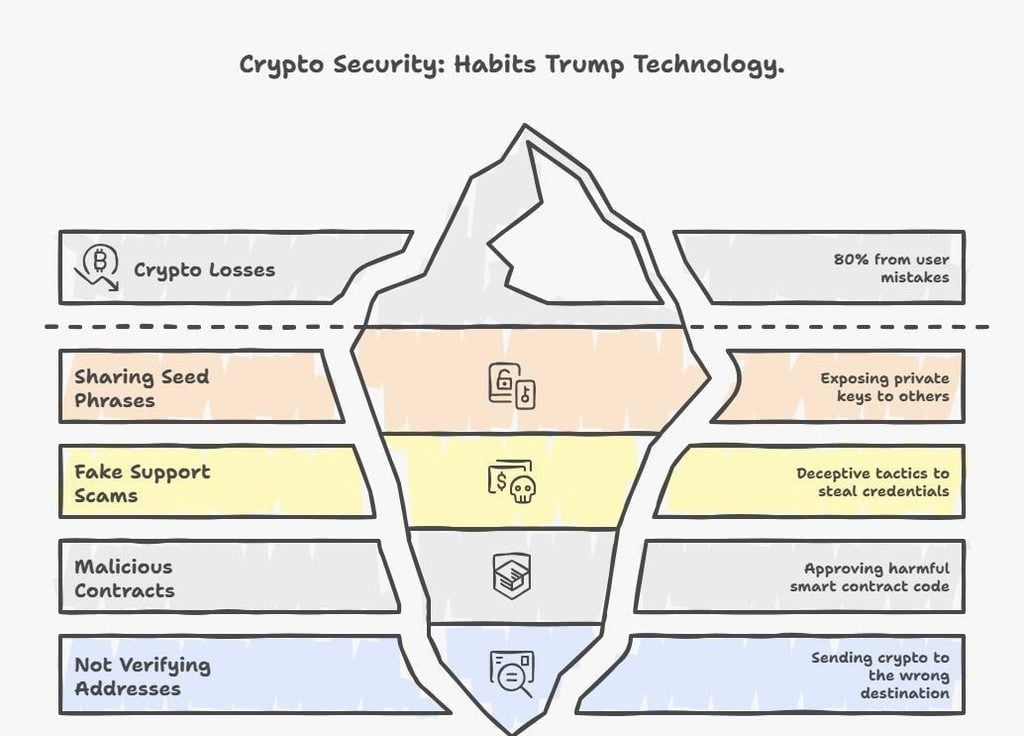
Here is the reality: in 2025, 80% of individual crypto losses were not from sophisticated hacks. They came from user mistakes. Sharing seed phrases. Falling for fake support scams. Approving malicious contracts. Not verifying addresses.
Good security is mostly about habits, not technology.
The 20-Point Security Checklist
The non-negotiables:
- Never share your seed phrase. Not with “support staff.” Not with family members unless it is part of estate planning. Not online in any form. Not in a photo on your phone. Every social engineering attack in 2025 ultimately targeted seed phrases. No legitimate service will ever ask for it.
- Use 2FA with an authenticator app, not SMS. SIM-swapping attacks cost $150 million in losses in 2025 alone. Attackers convinced phone carriers to transfer victims’ numbers, then reset account access. Use Google Authenticator or Authy instead. Never use text message-based 2FA for anything crypto-related.
- Verify every address before sending. Check at least the first 4 and last 4 characters of any address you send to. Clipboard malware is a real threat. It silently replaces the address you copied with the attacker’s address. Send a small test transaction first when you use a new address.
- Keep software updated. Wallet apps, operating systems, and hardware wallet firmware all release security patches. In October 2025, Ledger released a critical firmware update. Staying current protects you.
- Bookmark official wallet websites. Phishing sites look identical to real ones. The URL differs by one character. Bookmark the correct URL the first time you find it and use only that bookmark from then on.
Intermediate protection:
- Test your wallet recovery before depositing large amounts. Practice restoring from your seed phrase with a test wallet that contains nothing. Know the process before you need it under pressure.
- Use a hardware wallet for holdings over $5,000. A $150 investment to protect $10,000 or more is a straightforward decision. Zero major cold wallet hacks occurred in 2025 when devices were used correctly.
- Use separate wallets by purpose. One for storage. One for active trading and DeFi. One for testing new protocols you are not sure about. Isolating risk between wallets limits the damage from any one mistake.
- Revoke token approvals regularly. When you interact with a DeFi protocol, you give it permission to spend your tokens. Old approvals stay active indefinitely. A malicious contract can drain your wallet using an old approval. Visit revoke.cash or etherscan.io and remove anything you no longer need. Do this monthly.
- Disable blind signing on hardware wallets. This setting forces your hardware wallet to show you the full transaction details before you sign. Security researcher Patrick Collins noted that this single step could have prevented Bybit-style attacks, because users would have seen what they were actually approving.
Advanced protection:
- Use multi-signature setups for holdings over $50,000.
- Store seed phrases on metal backup plates instead of paper. Paper burns, gets wet, and deteriorates.
- Keep copies of your seed phrase in separate physical locations (bank vault and home safe, for example).
- Only download wallets from official websites. Verify the developer identity in app stores. In 2025, fake MetaMask clones proliferated in app stores.
- Set up transaction alerts using blockchain explorers. Respond immediately to any unauthorized activity.
- Never access crypto wallets on public WiFi.
- Have an estate plan that tells your heirs how to access your funds after you die. Crypto with no succession plan is crypto that disappears.
- Consider insurance for large holdings. Some custodial services offer coverage up to $250,000. Lloyd’s of London offers third-party crypto insurance.
Also Read: Can Crypto be Stolen from Wallet? Can Crypto be Hacked?
The Seven Common Attacks and How to Stop Them
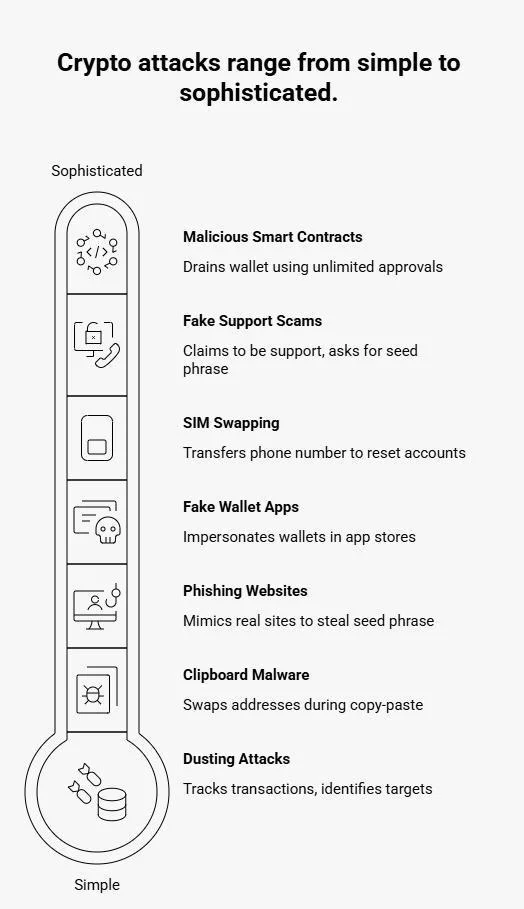
Here are seven major attacks in crypto and how to stop them
Phishing websites and emails
Fake websites mimic real wallet interfaces perfectly. You receive an urgent “security update” email, click the link, enter your seed phrase, and it is gone. The September 2025 npm package compromise used this approach to steal developer wallet credentials.
Defense: bookmark official URLs, never enter your seed phrase on a website, verify SSL certificates.
Fake wallet apps
Malicious apps impersonate real wallets in app stores with nearly identical names and icons. They steal your seed phrase when you type it in during “setup.” Dozens of fake MetaMask apps appeared in 2025.
Defense: verify the exact developer name in the app store. Check download counts. For major wallets, the number should be in the millions. Read recent reviews. Download only by following links from the official website.
Clipboard malware
Malware running on your device monitors your clipboard. When you copy a crypto address, it swaps it for the attacker’s address. You paste what looks right, but the funds go elsewhere.
Defense: always verify addresses character by character. Use your wallet’s address book for regular recipients. Send a small test amount first.
SIM swapping
An attacker contacts your phone carrier and convinces them to transfer your phone number to a new SIM card. With your number, they reset accounts that use SMS 2FA and drain your funds. This cost victims $150 million in 2025.
Defense: never use SMS-based 2FA. Use authenticator apps. Set a carrier PIN or password to prevent unauthorized number transfers.
Fake support scams
Someone contacts you on Discord or Telegram claiming to be wallet support. They create urgency (“your account will be suspended in 24 hours”) and ask for your seed phrase or remote access to your device. AI voice cloning made these attacks 400% more common in 2025.
Defense: no legitimate support service will ever ask for your seed phrase. Ignore all unsolicited crypto messages. Contact support only through official website ticket systems.
Malicious smart contract approvals
You interact with a DeFi app that requests unlimited token approval for “convenience.” A malicious contract quietly drains your wallet using that permission later. Wallet drainer attacks were up 50% in 2025.
Defense: approve only the exact amount needed. Revoke old approvals monthly. Use a separate wallet for experimental protocols.
Dusting attacks
An attacker sends tiny amounts of crypto to your wallet. This allows them to track your transaction patterns and identify large holdings for targeted follow-up scams.
Defense: do not interact with tokens you did not request. Mark them as spam in your wallet. Use different addresses for different purposes.
Also Read: Top 11 White Label Digital Wallets for Businesses
Step-by-Step Setup Guides
How to Set Up MetaMask (Hot Wallet)
MetaMask is the most popular hot wallet with 100 million or more users and the best compatibility across DeFi protocols.
Step 1: Download and install
Go to metamask.io. Bookmark the URL right now. Click “Download” for your platform. Verify the developer is MetaMask by ConsenSys. Install the browser extension or mobile app.
Step 2: Create your wallet
Click “Create a new wallet.” Read and accept the terms. Create a strong password with at least 12 characters. This password encrypts the wallet on your device only. It does not replace your seed phrase.
Step 3: Secure your seed phrase
MetaMask shows your 12-word recovery phrase. Write it down on paper right now. No screenshots. No digital storage. MetaMask will ask you to verify by entering words in order. Store the paper in a safe place. Seriously consider a metal backup if you plan to keep significant funds here.
Step 4: Enable security settings
Go to Settings, then Security and Privacy. Turn off the “Show balance” toggle for more privacy. Never approve “setApprovalForAll” without researching what you are signing. Set a password timeout so the wallet auto-locks.
Step 5: Add more networks
MetaMask defaults to Ethereum. Click the network dropdown to add Polygon, Arbitrum, Optimism, or BSC. Use chainlist.org to get accurate network details.
Step 6: Test before committing
Send $5 to $10 from an exchange. Practice sending it back. Verify your seed phrase recovery using a second test wallet. Only then move larger amounts.
Important reminder: MetaMask is a hot wallet. Do not store your life savings here. Keep it to 20% or less of your total portfolio.
Setting Up a Ledger Hardware Wallet (Cold Storage)
Ledger is the industry standard for hardware wallets with 5,500 or more supported assets.
Step 1: Buy from the official source
Purchase only from ledger.com. Never buy from Amazon, eBay, or any third party. When it arrives, verify the box is sealed and tamper-evident. The device should be completely blank with no pre-installed seed phrase. If you receive a device with a pre-written seed phrase included, return it immediately. This is a known scam.
Step 2: Initialize the device
Connect your Ledger to a computer via USB. Choose “Set up as new device.” Create an 8-digit PIN. Do not use your birthday or a simple pattern. The PIN protects the device if it is stolen. It does not replace your seed phrase.
Step 3: Record your seed phrase
Your most important step. Your Ledger will show you 24 words one at a time. Write them on the included recovery sheet in exact order. Never type these words into a computer. Never photograph them. Ledger will then quiz you to confirm you recorded them correctly.
Step 4: Store the seed phrase securely
At minimum, keep it in a home safe in a sealed envelope. Better: copies in both a bank safe deposit box and your home safe. Best: a metal backup plate at multiple secure locations.
Step 5: Install Ledger Live
Download Ledger Live from ledger.com. Install it on your computer or phone. Add accounts for Bitcoin, Ethereum, or whatever you hold.
Step 6: Update firmware
Ledger Live will prompt you to update. Always do this. Firmware updates include security patches.
Step 7: Test recovery before depositing anything significant
Send $10 to $20 to your Ledger. Then reset the device through Settings. Restore it using your seed phrase. Verify the funds are still accessible. This one step proves your backup works. Do it before you move any serious amount.
Setting Up Exodus (Multi-Asset Hot Wallet)
Exodus is beginner-friendly, supports 260 or more assets, and has a clean interface.
Step 1: Download from exodus.com. Available for Windows, Mac, Linux, iOS, and Android.
Step 2: Create your wallet. Click “Create New Wallet.” Exodus generates a seed phrase automatically.
Step 3: Back up your seed phrase. Go to Settings, then Backup. Write down your 12 words. Store them offline. Exodus will test you.
Step 4: Add your assets. Go to Wallet, then Add Asset. Enable the coins you want to hold.
Step 5: Set a password. Go to Settings, then Security. This adds basic access protection.
Step 6 (Optional): Connect a hardware wallet. Exodus lets you pair Trezor or Ledger through Settings. This gives you the Exodus interface with hardware-level security underneath.
Note: Exodus is not open-source, which means its code cannot be independently verified. Use it for active amounts, not large-scale cold storage.
Setting Up a Multi-Signature Wallet (For Large Holdings)
Gnosis Safe is the standard tool for multi-sig setups. This is for holdings of $50,000 or more, institutional use, or shared funds.
Step 1: Visit safe.global. Connect an existing wallet (MetaMask works) as the first owner.
Step 2: Add additional owner addresses and set your threshold. Common setups are 2-of-3 (you, a partner, and a backup device), 3-of-5 for business use, or 4-of-7 for DAO treasuries.
Step 3: Deploy the Safe. Pay the deployment gas fee. Save the Safe address. All owners should bookmark the URL.
Step 4: Test with a small amount first. Initiate a transaction, have the required number of owners approve it, and verify the mechanism works before sending large amounts.
Step 5: Document everything. Write procedures for how transactions are approved. List all signers and their contact details. Have a plan for what happens if a signer is unavailable or dies.
Understanding Fees and Costs
Gas Fees: What You Actually Pay
Every transaction on a blockchain requires a fee. This goes to the validators or miners who process transactions. It is set by the blockchain, not by your wallet. Fees vary by network congestion and by blockchain.
Average fees as of late 2025:
| Blockchain | Average Fee | Speed |
| Ethereum | $1 to $50 | 12 to 15 seconds |
| Bitcoin | $0.50 to $10 | 10 to 60 minutes |
| Solana | Under $0.001 | Under 1 second |
| Polygon | $0.01 to $0.50 | 2 to 3 seconds |
| Arbitrum | $0.10 to $2 | 2 to 3 seconds |
| BSC | $0.05 to $1 | 3 seconds |
If you make frequent small transactions, this matters a lot. Swapping $1,000 on Ethereum might cost $20 in gas. The same swap on Polygon costs about $0.25. On Solana, it costs less than a fraction of a cent.
How to Reduce Gas Fees
Time your transactions during low-congestion periods. Ethereum is cheapest on weekends and early US morning hours. Tools like the Etherscan Gas Tracker show you real-time fees so you can wait for a dip.
Use Layer 2 networks for Ethereum activity. Arbitrum and Optimism offer 90% lower fees than mainnet Ethereum for most DeFi interactions.
Use low-fee blockchains for small, frequent transactions. If you are dollar-cost averaging small amounts weekly, Solana or Polygon will save you meaningful money over time.
Avoid in-wallet swap markups. When you swap inside wallets like MetaMask (0.875% fee) or Exodus (1 to 3%), you pay above market rates. Use the DEX directly for better prices.
Tax Considerations
In the United States, the IRS treats crypto as property. This means:
- Swapping one crypto for another is a taxable event
- Selling for USD is taxable
- Receiving crypto as payment is taxable income
- Staking rewards are taxable income
- Transferring between your own wallets is not taxable
You are required to track the date, type, dollar amount at time of transaction, cost basis, and resulting gain or loss for every taxable event.
Tools like CoinLedger, Koinly, CoinTracker, and TaxBit connect to your wallets via public address and automate this. If you hold significant amounts, use one of these tools. Tax laws vary internationally. EU rules depend on country. UK applies Capital Gains Tax on disposals. Australia treats crypto the same as capital gains.
Keep records for at least seven years to match the IRS statute of limitations.
Regulatory Considerations by Region (2026)
European Union
The EU’s MiCA regulation (Markets in Crypto-Assets) came into full effect in December 2024 and has been enforced throughout 2025 and 2026. Wallet service providers must now register as Crypto-Asset Service Providers. KYC and AML requirements apply to custodial wallets. About 21% of wallet providers adjusted their services for compliance. As a result, 67% of EU wallet usage is now KYC-linked.
For EU users, expect more identity verification when using custodial services. Non-custodial self-hosted wallets currently have fewer direct requirements, but regulatory requirements continue to tighten.
United States
The IRS now requires reporting of crypto transactions over $10,000. Exchanges report to the IRS through Form 1099-DA. Users with self-hosted wallets are responsible for their own reporting. About 15% of users shifted to compliant platforms after these rules took effect.
State-level regulations vary significantly. Wyoming has the most crypto-friendly laws. New York requires a BitLicense for custodial services. Texas has passed pro-crypto legislation. California is still developing its framework.
The current US administration has taken a less restrictive approach to crypto overall, focusing more on consumer protection than prohibition.
Asia-Pacific
Japan treats self-hosted wallets with more restrictions. KYC requirements for custodial services are enhanced. Singapore requires licenses for Digital Payment Token services but does not directly regulate self-hosted wallets. The UAE has developed the Virtual Asset Regulatory Authority framework and has seen 31% wallet adoption growth.
Countries Where Crypto Is Restricted or Banned
China, Algeria, Egypt, Morocco, Bolivia, and Nepal have banned or heavily restricted crypto transactions. If you are in one of these jurisdictions, know your local laws before using any wallet.
Compliance by Wallet Type
Custodial wallets require KYC identity verification and proof of address. They are subject to AML monitoring and transaction reporting rules. They may have withdrawal limits imposed by regulation. Non-custodial wallets generally do not require KYC for the software itself, but fiat on-ramps attached to them often do. Self-hosted wallets face increasing scrutiny in 9 countries as of 2025. DeFi access may be geoblocked in some jurisdictions.
If you travel internationally with a hardware wallet, be aware that some countries require you to declare it at customs. Accessing your wallet from a foreign IP may trigger security alerts. Different countries may tax the same transaction differently.
Common Mistakes and How to Avoid Them
Sending to the Wrong Address or Network
Blockchain transactions are irreversible. If you send ETH to a Bitcoin address, the funds are gone permanently. If you send tokens to a smart contract address that cannot receive them, they are gone permanently. If you send on the wrong network (BSC instead of Ethereum), recovery may be possible but requires technical knowledge.
Prevention: always verify the first 4 and last 4 characters of every address. Send a $5 test transaction first. Double-check the network you are sending on. Never type addresses manually. Copy and paste, then verify. This single habit prevents hundreds of millions in annual losses.
Losing Your Seed Phrase
An estimated 20% of all Bitcoin has been permanently lost due to misplaced or destroyed seed phrases. That is roughly $180 billion at current prices.
Without your seed phrase, there is no recovery. No company, no support team, no government agency can retrieve your funds. This is not a limitation of any particular wallet. It is how the blockchain works.
Prevention: write down your seed phrase the moment your wallet is created. Store it in multiple secure physical locations. Use metal backup plates if your holdings are significant. Test the recovery process with an empty wallet annually. Never store it digitally in any form.
Falling for Support Scams
This is the leading cause of individual fund loss in crypto. Someone reaches out claiming to be wallet support on Discord, Telegram, or even by phone. They create urgency. They ask for your seed phrase or remote access to your device. In 2025, AI voice cloning made these attacks 400% more convincing. Attackers could sound like someone you know.
Remember: no legitimate support service will ever ask for your seed phrase. Ever. Block all unsolicited crypto messages. If someone contacts you about your wallet, assume it is a scam until proven otherwise. Reach out to support only through the official website.
Approving Unlimited Token Permissions
Every time you interact with a DeFi protocol, you authorize it to spend your tokens. The default request is often for unlimited access. If that contract is later exploited, or if it was malicious from the start, it can drain your wallet. Wallet drainer attacks increased by 50% in 2025.
Prevention: set exact approval amounts when possible. Use revoke.cash or etherscan.io monthly to review and revoke old approvals. Use a dedicated separate wallet for experimental or unknown protocols.
Not Testing With Small Amounts First
Many users lose funds by sending their entire portfolio to a new wallet before verifying it works. They discover the wallet is incompatible, configured wrong, or inaccessible after the fact.
Always send $5 to $10 first. Verify you can receive. Then verify you can send back. Practice the seed phrase recovery with an empty wallet before depositing anything significant.
Weak Passwords and SMS Two-Factor Authentication
Simple passwords get guessed. Reused passwords from other hacked sites get tested. SMS 2FA gets bypassed through SIM swapping. These are known, documented attack vectors that cost people real money.
Use a password of at least 16 characters that is unique to each crypto service. Use a password manager like 1Password or Bitwarden. Never reuse passwords. Use an authenticator app for 2FA on every crypto account. For high-value accounts, consider hardware security keys like YubiKey.
Where Crypto Wallets Are Headed
Technology Trends to Watch
1. MPC Going Mainstream
Multi-Party Computation wallets eliminate seed phrases by distributing key management cryptographically. No single piece of information gives access to your funds. Zengo has pioneered this for regular users with a clean security record. Institutional custody has been adopting MPC rapidly. Analysts project about 30% of wallets will use MPC by 2027. If you hate managing seed phrases, MPC wallets are worth watching closely.
2. Account Abstraction (ERC-4337)
This is a major upgrade to how Ethereum wallets work. Instead of externally-owned accounts, smart contract wallets become possible. This means social recovery (trusted contacts can help you regain access), gasless transactions, better batch transaction support, and a much smoother experience for non-technical users. Ethereum Layer 2 networks are leading adoption.
3. Biometric Authentication
Fingerprint and face recognition are becoming standard. About 45% of new wallet releases in 2025 included biometric features. This reduces reliance on passwords and makes wallets more accessible without sacrificing security.
4. Post-Quantum Cryptography
Quantum computers are still years from posing a practical threat to current encryption. But “harvest now, decrypt later” attacks have emerged, where attackers collect encrypted data today hoping to decrypt it once quantum computers are powerful enough. The crypto world is working on quantum-resistant cryptographic standards. Wallets will need to update their underlying cryptography in the coming years.
5. Cross-Chain Everything
The future is multi-chain. Wallets are evolving toward unified interfaces that work across all blockchains smoothly. You will hold assets on 10 different networks but manage them from one screen. LayerZero, Wormhole, and similar protocols are making this technically possible.
6. Adoption Trends
The numbers from 2025 are striking. Over 560 million crypto holders worldwide, up from 300 million in 2023. One in four adults now owns some form of crypto. PayPal has 10 million crypto wallet users. Telegram wallet hit 14 million users. NFTs are present in 36% of all wallets.
The next wave of adoption is coming from improved user experience (seed phrase elimination, social recovery), institutional involvement (banks like State Street and BNY Mellon now offer crypto custody), real-world utility (stablecoin payments, remittances), and geographic expansion (Middle East, Latin America, Africa, and Southeast Asia are all growing fast).
The friction that kept people away is slowly being removed.
Conclusion and Key Takeaways
Choosing the right crypto wallet is one of the most important decisions you will make in crypto. More important, in many ways, than which coins you buy.
In 2025, over $2.1 billion was stolen in just six months. The Bybit hack alone cost $1.4 billion. And yet, people who used proper cold storage had their funds completely protected through all of it. The contrast tells you everything.
The decision framework is not complicated once you break it down. Assess your holdings. Decide how often you transact. Match that to a wallet type. Use multiple wallets for different purposes. Secure them properly.
If you are just getting started with under $2,000: begin with Coinbase for ease of use, enable 2FA, and try Zengo to learn self-custody without seed phrase risk.
If you are actively trading with $2,000 to $25,000: set up MetaMask or Phantom for DeFi and buy a Ledger Nano X for 70% of your holdings.
If you are a long-term holder with $25,000 or more: buy two hardware wallets, set up secure multi-location seed phrase storage, and keep hot wallet activity minimal.
If you are managing institutional or business funds: implement Gnosis Safe multi-sig, get proper compliance review, and consider insured custody through BitGo or Fireblocks.
The 10 things that will keep your funds safe:
- Never share your seed phrase with anyone, for any reason
- Test with small amounts before committing anything significant
- Use hardware wallets for holdings above $5,000
- Enable 2FA using an authenticator app, never SMS
- Verify addresses character by character before every transaction
- Back up your seed phrase offline in multiple secure locations
- Keep separate wallets for storage, trading, and experimental use
- Revoke token approvals monthly
- Keep all wallet software and firmware updated
- No legitimate support person will ever ask for your seed phrase, ever
The technology keeps improving. Seed phrases are being replaced by MPC. Account abstraction is making wallets smarter. Regulation is bringing clarity. More people are entering crypto than ever before.
But through all of that change, the fundamentals stay the same: your keys, your crypto. Someone else’s keys, someone else’s crypto.
Start simple. Learn as you go. Secure what matters.
Frequently Asked Questions
What is the safest crypto wallet?
For holdings over $5,000, a hardware wallet (Ledger or Trezor) stored offline and properly backed up is the safest option. For maximum security, pair it with a multi-signature setup. Zero major cold storage hacks occurred in 2025 while over $2.1 billion was stolen from hot wallets. However, “safest” depends on your situation. Hardware wallets sacrifice convenience for security. For active trading, a properly secured hot wallet (with 2FA and seed phrase backup) balances safety and usability. Most experienced users keep 70 to 90% in cold storage and 10 to 30% in hot wallets.
Hot wallet or cold wallet: which should I choose?
Choose based on what you will do with your crypto.
- Hot wallet if: you trade frequently, use DeFi, want instant access, or hold under $5,000. These carry more hack risk (62% of 2025 thefts) but are practical for active use. Examples: MetaMask, Trust Wallet, Phantom.
- Cold wallet if: you hold $5,000 or more, your strategy is buy-and-hold, and you prioritize security. Examples: Ledger, Trezor.
The recommended approach: use both. Cold wallet for bulk holdings (70 to 90%), hot wallet for active use (10 to 30%). Test both before committing large amounts.
What is the difference between custodial and non-custodial wallets?
- Custodial: an exchange or service holds your private keys. Like a bank account, it is convenient but you do not truly own your crypto until you withdraw. Pros: password recovery, customer support, beginner-friendly. Cons: exchange hack risk (Bybit lost $1.4 billion in 2025), potential account freezing, not truly your crypto. Requires KYC.
- Non-custodial: you hold the private keys. Full ownership, full responsibility. Pros: true ownership, no middleman. Cons: lost keys mean lost funds forever, no support, more technical knowledge required.
- Recommendation: beginners start custodial to learn, then graduate to non-custodial as comfort grows. Never leave large amounts on exchanges long-term.
What happens if I lose my seed phrase?
Your crypto is permanently and irreversibly gone. No recovery exists. No customer support can help. Estimated 20% of all Bitcoin is lost this way.
Prevention: write it down on paper the moment your wallet is created. Store it in at least two secure physical locations. Consider metal backup plates. Test the recovery process with an empty wallet annually. Never store it digitally.
There is no “forgot seed phrase” button. Prevention is the only answer.
Can crypto wallets be hacked?
Hot wallets can be compromised. In 2025, $2.1 billion was stolen from them through phishing, malware, fake apps, clipboard swaps, and SIM swaps.
Cold wallets are much harder to attack when properly used. Zero major cold storage hacks occurred in 2025. The physical device would need to be compromised and the PIN known simultaneously. Private keys never leave the device during normal use.
Most individual losses are actually user errors: sharing seed phrases, approving malicious contracts, falling for phishing. Hardware wallets provide strong protection, but only if you buy from official sources, store the seed phrase securely, keep firmware updated, disable blind signing, and verify transactions on the device screen itself. Security is about 80% behavior and 20% technology.
How much does a crypto wallet cost?
Software wallets are free. MetaMask, Trust Wallet, Exodus, Phantom: all free to download with no subscription fees. You pay only network gas fees when you transact.
Hardware wallets range from $49 to $249 as a one-time purchase: Trezor Model One ($49), Tangem ($55), Ledger Nano X ($149), Trezor Safe 5 ($169), Ledger Flex ($249). No ongoing costs after purchase.
Think of a hardware wallet as insurance. A $150 purchase to protect a $10,000 portfolio is not an expense. It is protection.
Do I need more than one wallet?
Yes, most experienced users have three or more wallets: a cold storage wallet for 70 to 80% of holdings (Ledger or Trezor), a hot active wallet for 15 to 25% of holdings (MetaMask or Phantom for DeFi and daily use), and an exchange wallet for 5 to 10% (Coinbase for fiat access and quick trades). Many also keep a separate experimental wallet for risky or untested protocols.
Why? Security through separation. When Bybit lost $1.4 billion, users who followed this approach only had 5 to 10% exposed.
What if I send crypto to the wrong address?
If you sent to the wrong address type (ETH to a BTC address): funds are permanently lost. If you sent on the wrong network (BSC instead of Ethereum): may be recoverable with technical knowledge, but it is complicated. Either way, the transaction cannot be reversed.
This is why the test transaction habit matters so much. Always send $5 to $10 first. Verify the first 4 and last 4 characters. Check the network. Use wallet address books for regular contacts.
Are crypto wallets legal?
Yes, in most countries. Legal with regulation in the US, EU, Canada, UK, Japan, Australia, and Singapore. Unclear or restricted in a small number of jurisdictions. Banned in China, Algeria, Egypt, Morocco, Bolivia, and Nepal.
In 2025, the EU rolled out MiCA, and 24 countries introduced new wallet compliance frameworks. Nine countries now restrict self-hosted wallets in some way. Know the rules in your jurisdiction. Report for tax purposes. Comply with KYC where required.
What is MPC and why does it matter?
MPC (Multi-Party Computation) is a cryptographic method that eliminates seed phrases by splitting your private key into encrypted pieces stored in separate locations (your device, a cloud backup, a biometric recovery system). No single piece gives access on its own.
Why it matters: it removes the biggest risk for most users, which is losing or exposing a seed phrase. About 20% of all Bitcoin has been lost this way. Zengo pioneered consumer MPC and had zero hacks as of April 2025.
Trade-off: it is newer technology, less battle-tested than traditional wallets, and relies partly on the provider’s infrastructure. As it matures, MPC is likely to become standard because it solves the seed phrase problem without sacrificing security.