


Your business is leaving money on the table if you’re not accepting crypto payments. The global crypto payment gateway market, valued at $2.39 billion in 2026, is projected to hit $4.74 billion by 2030.
However, the problem isn’t demand but the setup. Most businesses don’t know where to start. That’s where Upay API integration comes in.
Upay gives businesses a clean, developer-friendly way to accept crypto payments, issue branded cards, and send payouts globally without building payment infrastructure from scratch.
Key Takeaways
- Upay API integration lets businesses accept crypto payments, issue branded cards, and send payouts without building payment infrastructure from scratch
- The integration process follows several steps: sign up, read the docs, set up sandbox, generate API keys, make your first request, configure webhooks, and go live
- Every Upay API request requires IP whitelisting, four custom headers, and a cryptographic signature valid for 60 seconds
- The sandbox environment is available to all partners and lets you test safely before going live
Read Also: Best Crypto Cards With Apple Pay and Google Pay Support
What Is Upay?
Founded in 2023, Upay is a global crypto payments platform built to move money, not just store it. While many providers focus solely on wallets or exchanges, Upay combines payment infrastructure, card issuance, crypto acceptance, and payout capabilities into a single ecosystem designed for both consumers and businesses.
The company operates two distinct platforms. Its consumer offering, available through Upay.best, provides users with a crypto wallet and crypto-linked payment cards for spending digital assets worldwide.
On the business side, business.upay.com delivers enterprise-grade infrastructure that enables companies to accept cryptocurrency payments, launch branded Visa cards through its White Label solution, manage wallets, and automate bulk payouts through a unified API.
What sets Upay apart is its payments-first approach. Rather than offering standalone crypto services, it provides end-to-end financial infrastructure that helps businesses bridge blockchain and traditional finance.
Through a single integration, companies can accept crypto, convert funds, issue cards, manage compliance, and settle payments globally.
Security and compliance sit at the core of the platform. Upay is Dubai-licensed and works with security partner SlowMist, settlement partner StraitsX, KYC partner Sumsub, and Tencent Cloud for infrastructure.
That’s a compliance-first stack built for businesses that need secure, scalable, and regulated payment solutions for global operations.
What Is an API and Why Does It Matter for Payments?
Source: business.upay.com
An API (Application Programming Interface) is a bridge between two software systems. It lets your website or app talk to another platform and exchange information automatically.
Think of it like a restaurant order system where you tell the waiter what you want. The waiter goes to the kitchen where the food is prepared and sent back. You never see the kitchen.
An API works the same way. Your website sends a request, and Upay’s system processes it and sends back a response. Your customer never sees any of the work happening underneath.
Without an API, accepting crypto would require running your own blockchain node, monitoring incoming transactions manually, handling currency conversions, and building your own security layer.
That’s months of engineering. However, with Upay API integration, you connect once, and the platform handles the rest.
Read Also: Coin Ticker: The Three Letters That Speak for a Whole Crypto Project.
What You Can Do with Upay API Integration
The Upay Business API covers several core capabilities and can be viewed at https://upay-api.readme.io/reference/api-list.
Crypto Payment Acceptance (Acquirer API)
Enable your business to accept crypto payments from customers worldwide with a smooth payment infrastructure.
The Acquirer API generates unique wallet addresses for every transaction, allowing you to track payments accurately and automate reconciliation.
It also lets you create and manage orders, process refunds, and cancel transactions when necessary, giving merchants complete control over the payment lifecycle while simplifying crypto acceptance at scale.
Card Issuance (Card API)
Launch branded virtual and physical payment cards without building the infrastructure from scratch. The Card API allows you to issue cards to customers and manage every stage of the card lifecycle, from activation and funding to locking, unlocking, and cancellation.
UPay, through its White Label solution, handles card manufacturing, fulfillment, and delivery, enabling businesses to offer a fully branded card program with minimal operational overhead.
Crypto Wallet Management (Wallet API)
Build secure crypto wallet functionality directly into your platform. The Wallet API enables businesses to generate and manage wallet addresses, monitor deposits, process withdrawals, and move digital assets efficiently.
Integrated AML controls help screen incoming transactions and support compliance requirements, making it an ideal solution for exchanges, fintech platforms, and applications that custody funds on behalf of users.
Payouts (Outlay API)
Automate crypto payouts to individuals or businesses anywhere in the world. The Outlay API allows platforms to send funds to external wallet addresses quickly and efficiently, whether for payroll, freelancer payments, affiliate commissions, rewards programs, or mass disbursements.
Designed for high-volume transactions, it streamlines payment operations while reducing the complexity of managing large-scale crypto transfers.
How Upay API Integration Works, Step by Step
Here’s how the Upay API integration process works from sign-up to your first live transaction.
Step 1: Sign Up and Complete KYC
Source: business.upay.com
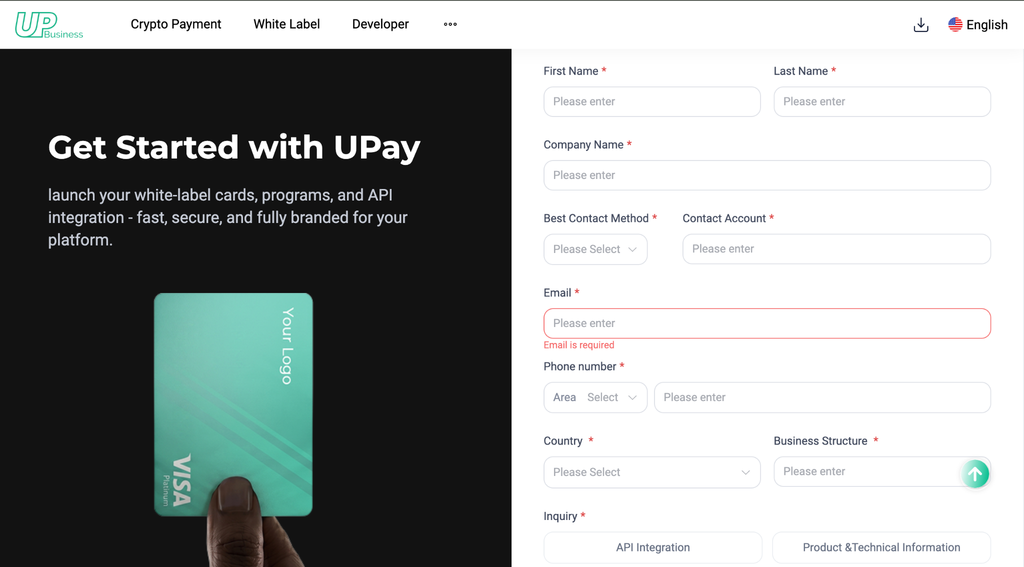
First, you will need to reach out directly to their commercial team via the Upay website to request access to their scalable B2B infrastructure and API tools.
Once you’re on the webpage, scroll down to Partner with Us and click the tab. The page will open to the image above; fill in the required information under the Inquiry section, select the API Integration tab, and click the Request Free Demo tab.
Once the Upay team reaches out to you, download Upay from the website or via Apple Store or Google Play Store and create a business account.
Before you access the API, you’ll complete identity verification (KYC). This is standard for any regulated payment platform and protects both you and your customers.
Step 2: Read the Developer Documentation
Every API comes with documentation that acts as an instruction manual. It explains the available endpoints, what data to send, and what to expect back.
Read the docs before writing a single line of code. Upay provides full API documentation through their developer portal at https://upay-api-en.readme.io.
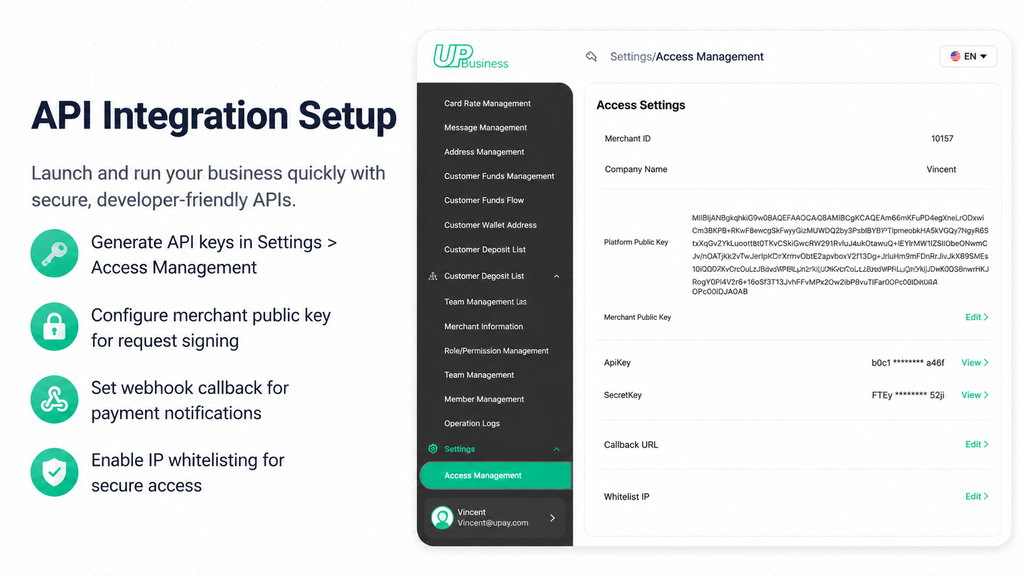
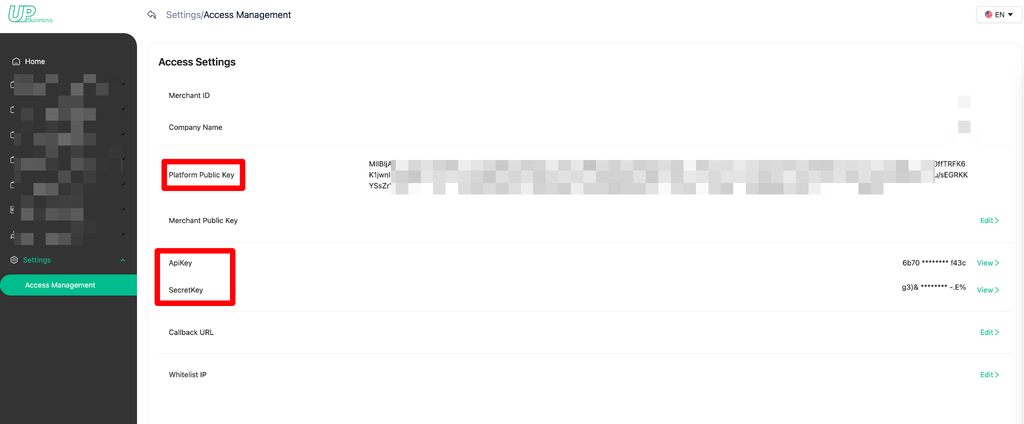
Step 3: Get the Platform’s Public key/API key/Secret key
Source: upay-api-en.readme.io
Get the platform’s public API key/API key/secret key from your merchant dashboard. An API key is a long string of characters that acts as your account’s password when communicating with the Upay system.
- API Key: Provided by UPay, a unique identifier for the merchant.
- Secret Key: Used for data signing when requesting the API.
- Platform Public Key: Provided by UPay, used for encrypting parameters when requesting the API.
- Platform Private Key: Used by UPay to decrypt the parameters after receiving the API request, obtaining the original data.
Example:
—–BEGIN PUBLIC KEY—–
MIIBIjANBgkqhkiG9w0BAQEFAAOCAQ8AMIIBCgKCAQEA2r69mrDofiNPIAKNRV5v
BeVBjEnrYPgKf8LKDK+gLhLrepuTc+gxlJurH/gYwgRwD8DL5rmdcXRZMpX+L8gx
yszzD0qFWnBoumN1RHx2kkok1vgLr/dBlJRwVPZbZT69m/B8kGWR8JboBVOWJwxn
DX6WaRDyWVa2qu1KogQq4m028gJWZlVzs0bSExQqSW5ZiUFGyJygjTa2XAKqceSe
xHov8jR66mpnv0vJy6+4YJK34t2VzyNdEqseTE3spZkSJCzzxNV7xIs63u/WTenK
J1BWar+/rA63A+/0Lt2BB/Uf/iq0OwGm4t2d0Pf1O7hylXXP65BGunWvu0QWCsNo
xQIDAQAB
—–END PUBLIC KEY—–
Important: Never put your API key directly in your website’s front-end code. Store it securely on your server, as anyone who finds it can make requests on your behalf.
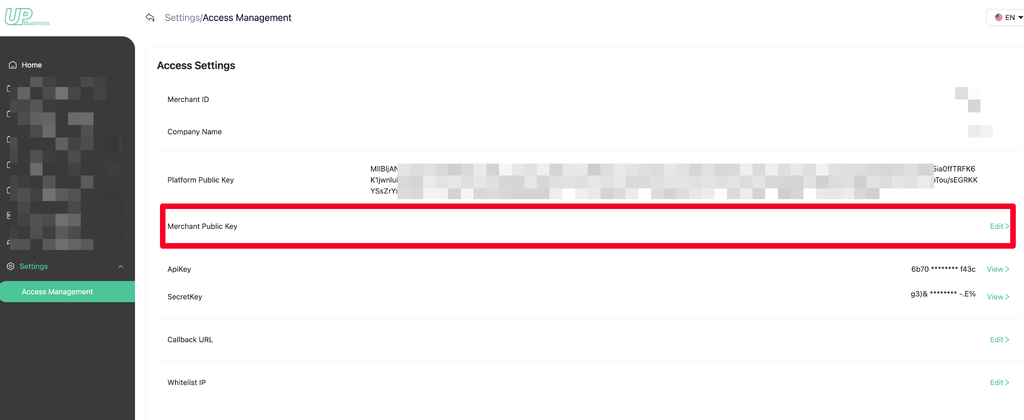
Step 4: Configure Merchant Public Key
Source: upay-api-en.readme.io
Merchant public key: The merchant configures the generated public key to the merchant platform. If an API request is encrypted, the response data will definitely be encrypted.
UPay will encrypt the response data using the merchant’s public key.
Merchant private key: After obtaining the API response data, the merchant decrypts it using the merchant private key to retrieve the original response data.
Step 5: Create Payment Request API
When a customer chooses to pay with crypto, your backend sends a request to the Upay API. The request tells Upay: A customer wants to pay. Generate a payment address.
POST /v2/payments/addresses
{ “chain”: “ETH”, “asset”: “USDT”, “label”: “order_00245”, “callback_url”: “https://yourshop.com/webhooks/crypto” }
Response: { “address”: “0x742d35Cc6634C0532925a3b844Bc…”, “asset”: “USDT”, “created_at”: “2026-05-18T10:30:00Z” }
Here’s what that request looks like in plain terms:
- What you send: The amount, the currency (e.g., USDT), and a callback URL (your webhook endpoint)
- What you get back: A unique wallet address and a QR code for the customer to scan.
Each order gets its own unique wallet address. This prevents any overlap between transactions and makes reconciliation straightforward.
Step 6: Set Webhooks
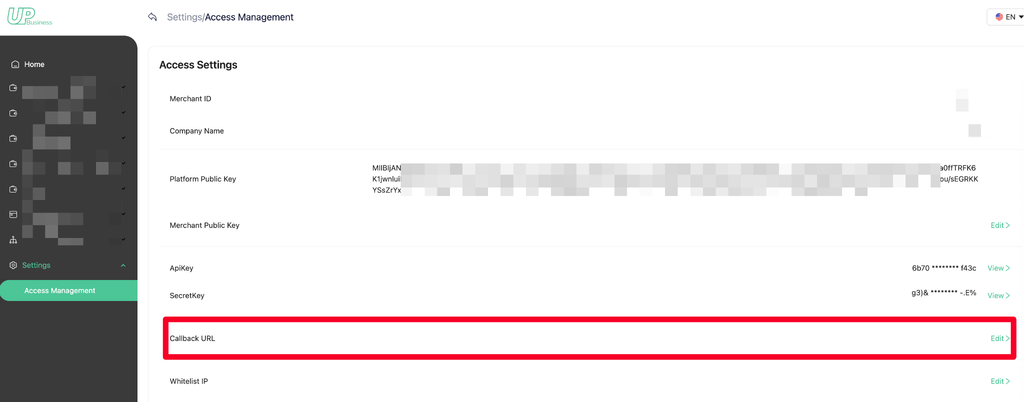
A webhook is an automatic notification Upay sends to your server when a payment is confirmed on the blockchain.
Instead of your system repeatedly asking, Has the payment arrived? Upay tells you the moment it does. Think of it like a courier delivery notification.
You don’t keep refreshing the tracking page; you wait for the text message. When the webhook arrives, your system updates the order status, sends the customer a confirmation, and triggers the next step in your fulfillment flow.
Read Also: What Does 5x Mean in Crypto?
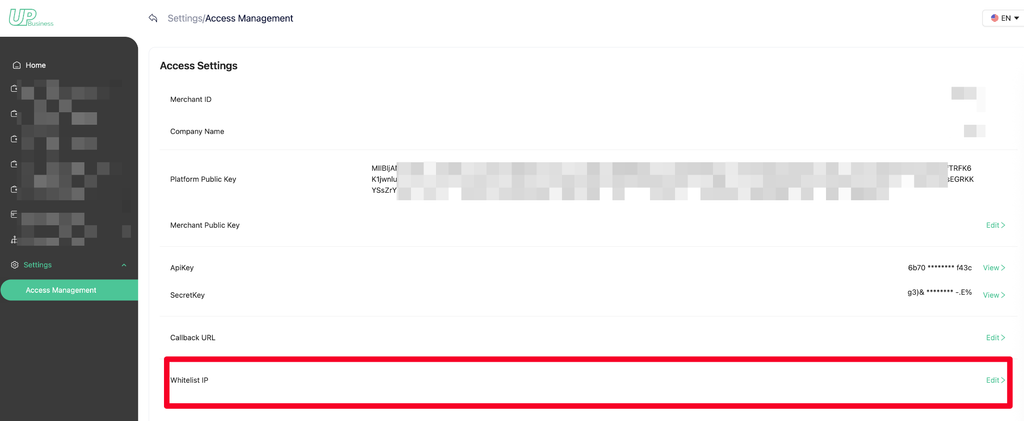
Step 7: Set a Whitelist of IPs
Source: upay-api-en.readme.io
Restrict API access by specifying the IP addresses allowed to connect. If no IP addresses are configured, the API accepts requests from all IPs by default.
You can whitelist multiple IP addresses by separating them with commas.
Example: 127.0.0.1, 127.0.0.2
Step 8: Set Up Your Sandbox Environment
A sandbox is a test environment where no real money moves. It mirrors the live system exactly. Upay’s test environment is available at https://openapi.upay-test.best and is accessible to all partners from day one.
Use the sandbox to simulate payments, trigger webhook notifications, and test how your system handles failed or partial payments. This step is very important, so don’t skip it.
Step 9: Go Live
Once everything is tested and verified, switch from sandbox mode to live mode using your production API key. Upay shares production environment credentials directly with approved partners after the onboarding review. Real payments can now flow through your system.
UPay API Environment
UPay offers separate sandbox and production environments, allowing developers to test integrations safely before going live. Build and validate your payment flows in the sandbox, then switch to the production environment when you’re ready to process real transactions.
| Environment | URL | Description |
| Test | https://openapi.upay-test.best | Available to all partners for building and testing their integration. |
| STG (Staging) | Currently unavailable | N/A |
| Production | Not publicly disclosed | The live mode environment provided by Upay |
Upay API Security: Access conditions and restrictions
Every API request to Upay must meet four security requirements.
| Security Factor | What It Does | Required |
| IP Whitelisting | Your server’s IP address must be registered with Upay before requests are accepted | True |
| Response IP Verification | Your system only accepts responses from Upay’s verified IP address | True |
| Webhook Callbacks | Some transactions trigger a second confirmation via webhook | False |
| 60-Second Signature Window | Each signed request expires after 60 seconds to block replay attacks | Yes |
The 60-second window is the most important. A replay attack is when someone intercepts a valid request and tries to resend it later.
The signature window prevents this. Make sure your server clock is synchronized using NTP (Network Time Protocol) before you start integrating.
Upay API Request/Response Headers
Every request/response requires four custom HTTP headers. These headers work together to verify that every request is genuine, timely, and coming from the right account.
- X-UPA-APIKEY: This is your unique API key assigned by UPay. Only those who possess this key can have access to make calls.
- X-UPA-REQUESTID: A unique ID for each request to prevent duplicate processing
- X-UPA-TIMESTAMP: The current timestamp in milliseconds
- X-UPA-SIGN: A cryptographic signature proving the request hasn’t been altered.
Request Headers
| Field | Data type | Explanation | Effect |
| X-UPA-APIKEY | String | Request for API Key | Identify and differentiate white-label users |
| X-UPA-REQUESTID | String | Request for a unique code | Request idempotence |
| X-UPA-TIMESTAMP | String | Timestamp in milliseconds | Request time; if not responded to within 60 seconds, timeout and do not respond to this request. Prevent replay attacks. |
| X-UPA-SIGN | String | Signature | Signature to verify the authenticity and correctness of the requestor. |
Response Headers
| Field | Data type | Explanation |
| X-UPA-REQUESTID | String | Request a unique code identical to the request ID to ensure consistency in the response. |
| X-UPA-TIMESTAMP | String | Response timestamp, timestamp, milliseconds |
A Real-World Example of Upay API Integration in Action
Tunde, a Lagos-based digital goods merchant, sells to customers across Nigeria, the UK, Canada, and the UAE. Previously, international bank transfers often took several business days to clear and incurred costly currency conversion fees.
After integrating the Upay API into his checkout process, payments became almost instant. When a customer in Toronto selects “Pay with Crypto,” Tunde’s system sends a request to Upay, which generates a unique USDT payment address and QR code.
The customer completes the payment from their wallet, and Upay automatically monitors and verifies the transaction on the blockchain. Once confirmed, a webhook notifies Tunde’s platform, triggering order fulfillment and delivery.
The entire process takes less than two minutes, eliminating banking delays and reducing unnecessary payment costs. According to Triple-A’s ownership data, global crypto ownership reached roughly 562 million people in 2024, up 34% from 420 million the year before.
That growth is exactly why more businesses like Tunde’s are adding a crypto checkout option instead of treating it as a niche feature, and UPay is delivering on a global scale.
Why Businesses Choose Upay
If you’re looking to integrate crypto payments without the technical complexity, UPay offers a practical and scalable solution. Its business.
API offers merchants multiple assets, white label card branding, and more with instant settlements and automatic crypto-to-fiat conversion.
Backed by regulatory registrations in the US, Canada, Hong Kong, and the UAE, UPay delivers the security, compliance, and global reach needed to streamline modern crypto payments and support long-term growth.